User Manual Marina
IFU revision 3, 2026-11-06
Version: v1.x
Manufacturer

Marina Health Denmark ApS
C/O Science Ventures Denmark A/S
Cortex Park 26E, 1.
5230 Odense M
Denmark
Email: support@marinahealth.eu
Website: www.marinahealth.eu
Manufacturing Date

2026-02-05
Unique Device Identifier

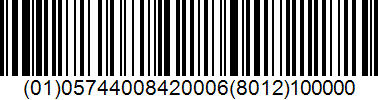
UDI-DI: (01)05744008420006
UDI-PI: (8012)100000
Basic UDI-DI: 574400842MarinaHealthM5
Medical Device


Marina is a class I medical device in accordance with Regulation (EU) 2017/745 (MDR).
Further Information
CE Marking Status: CE Marked
Users can request a physical copy of the user manual free of charge by reaching out to the manufacturer's customer support. It is sent within 7 calendar days of the request:
Email: support@marinahealth.eu
Symbols:
The symbols used on the label and in this manual are defined in ISO 15223-1:2021.
Manufacturer:
Indicates the medical device manufacturer (ISO 15223-1, 5.1.1).
Date of manufacture:
Indicates the date when the medical device was manufactured (ISO 15223-1, 5.1.3).
Unique Device Identifier:
Indicates a carrier that contains Unique Device Identifier information (ISO 15223-1, 5.7.10).
Medical device:
Indicates the item is a medical device (ISO 15223-1, 5.7.7).
Consult electronic instructions for use:

Indicates the need for the user to consult the instructions for use, which are provided in electronic form (ISO 15223-1, 5.4.3).
CE marking:
Indicates conformity with Regulation (EU) 2017/745 (Article 20).
Caution:

This symbol indicates that the current situation needs operator awareness or operator action in order to avoid undesirable consequences (ISO 15223-1, 5.4.4)
Product Description
Intended Use
Marina Health is intended to assist personnel in documenting medical conditions in remote environments. The software guides professional users (e.g. maritime medical officers) through predefined medical protocols and assures completeness of documentation to support consultation with healthcare professionals. The software is intended solely to support healthcare professionals by providing documentation assistance.
Intended Medical Indication
Marina Health is intended for documentation of common medical conditions encountered in maritime environments.
Characterization of User Profile
Marina Health is operated by professional personnel (e.g. maritime medical officers), who are assisted in documenting the medical history, the physical examination and vital signs. Professional users are maritime officers with the mandatory medical training for seafarers (STCW Regulation VI/4); they are not physicians. During the guided interview, the patient (e.g. a seafarer presenting with medical complaints) answers spoken questions in the presence of the medical officer; the patient does not operate the software and needs no specific education. Users require only basic technical proficiency with web browsers and mobile devices.
Characterization of Patient Population
Marina Health is designed to assist with the documentation of the conditions of patients, particularly seafarers and maritime personnel, of all ages presenting with various medical conditions in remote environments. The system is intended to be used regardless of patient gender, ethnicity, or pre-existing medical conditions.
Characterization of Use Environment Including Software / Hardware
Marina Health operates as a web application in modern web browsers and as native apps for iOS and Android, on smartphones, tablets, and laptop/desktop computers, requiring internet connectivity and microphone access for voice recognition features. The typical use environment is onboard maritime vessels.
Exclusions

The software is not intended to replace professional medical judgement and all diagnosis and treatment decisions. The final responsibility always lies with the medical personnel.
Safety Information
Contraindications
- Do not use as the sole means of medical assessment without appropriate professional medical oversight.
- Do not use to manage emergency medical situations without concurrent activation of appropriate emergency medical services.
- Do not use for direct diagnosis or prescription of medications without professional medical input.
- Do not use as a replacement for professional medical judgment.
- Do not continue using the system during a technical malfunction or system failure; revert immediately to standard manual documentation procedures.
- Do not rely solely on AI-extracted information without independent verification by qualified clinical personnel.
- Do not use the system without first verifying that hardware, software and connectivity meet the requirements specified in the manual.
- Not for use by personnel who have not been trained in the use of the software.
Warning and Remaining Risks
Medical officer must always review the documentation before sending it to the maritime physician.
Downloaded PDF reports contain patient data. Store them securely, with access limited to authorised persons, and delete them when they are no longer needed.
Reporting a Serious Incident
If you want to report a serious incident which occurred with this medical device, then you can do so by contacting your national competent authority under the following contact information:
Denmark:
Lægemiddelstyrelsen (Danish Medicines Agency)
Axel Heides Gade 1
2300 København S, Denmark
Phone: +45 44 88 95 95
Email: dkma@dkma.dk
Website: https://laegemiddelstyrelsen.dk
For users in other countries, contact your national competent authority for medical devices.
Language
Danish, English, German, Norwegian, Polish
System Requirements
Hardware
Any computer, smartphone or tablet capable of running a web browser with minimum specs defined in this document.
Software
Marina works for both Android and iOS. The iOS app requires iOS 18 or later; the Android app requires Android 7.0 or later. Software works for following mobile phone browsers:
- Safari 18.5 and above
- Chrome 135.0.7049.83 and above
- Firefox 141.1 (58972) and above
- Ecosia 141.0.7390.70.12 and above
Marina works in Ubuntu, macOS and Windows. Software works for following web browsers on computer:
- Safari 18.6 and above
- Chrome 142.0.7444.59 and above
- Firefox 144.0.2 and above
- Edge 126.0.2592.61 and above
Compatible Measuring Devices
Marina can be used with vital signs measured with any standard thermometer, blood pressure monitor and pulse oximeter. Marina does not connect to these devices; the medical officer reads the values and enters them. Use the following units:
- Temperature: °C
- Blood pressure: mmHg
- Pulse: beats/min
- Respiratory rate: breaths/min
- Oxygen saturation: %
IT-security Measures
The full version requires login with e-mail address and password; the free version in the apps can be used without an account. Computer firewall on the client side has to allow WebRTC traffic for uninterrupted operation.
Installation
No installation is required for the web application. Software is accessible through web browser. The iOS and Android apps are installed from the App Store and Google Play.
Safety and Maintenance
The software's lifetime is established to be 5 years. This is what is expected to be the maximum time until the implementation of a significant change, by which the manufacturer is able to react to the relevant changes to the software device environment, such as SOUP changes, cybersecurity innovations, or the evolving technological or medical state of the art.
Software Updates
Marina Health is updated by the manufacturer: the web application and the server automatically, the iOS and Android apps through the App Store and Google Play.
Frontend Updates
Updates to the user interface and browser-based components are deployed automatically. Users access the latest version by refreshing their browser or visiting the application URL. No manual installation is required.
Backend Updates: Server-side updates (API services, medical processing algorithms, PDF generation) are deployed via Docker container replacement on the production server. They require no user action.
Update Notification: Significant updates are announced by e-mail.
Reporting Malfunctions
Users should report software errors, system unavailability, or unexpected behavior to:
- Email: support@marinahealth.eu
- Response Time: Within 2 business days
Include: date/time, description of issue, steps to reproduce, screenshots, browser/device information, and impact on medical assessment.
Reporting Clinical Incidents
If the software may have contributed to patient harm, delayed treatment, or incorrect medical information, report immediately to:
- Email: regulatory@marinahealth.eu
- Response Time: Acknowledged within 24 hours
Users must also report serious incidents to their national competent authority as required by MDR 2017/745.
Lost Password and Account Access
If you have forgotten your password, use "Forgot your password?" on the login screen to reset it. For access issues, verify internet connectivity, browser compatibility, and contact technical support: support@marinahealth.eu
Reporting Security Breaches
If you suspect unauthorized access, data leak, or cybersecurity concerns:
- Stop using the system for sensitive patient data
- Report immediately: security@marinahealth.eu
- Response Time: Acknowledged within 24 hours
Video Tutorial
For a visual walkthrough of Marina's features and workflow, watch our tutorial videos:
Getting Started with Marina: https://www.youtube.com/shorts/afRaDp-qv0g
Marina Note Taker Mode: https://www.youtube.com/shorts/CvtXlzz-4pw
Using the Software
Getting Started:
- Open Marina in a web browser or in the iOS or Android app.
- Create an account with your e-mail address and vessel details, and confirm your e-mail address. Your account is activated by Marina Health before first use.
- Log in with your e-mail address and password.
- Before your first consultation, read the notice "How Marina uses AI" and confirm it.
- Allow access to the microphone when asked. The camera is only used to take photos for the report, and the location only to fill in the vessel position; both are optional.
- Marina opens with the tabs AI Interview, Note Taker and Translator. Your profile (a tab in the apps, the menu at the top right on the website) contains your personal and vessel details, the Instructions for Use, About Marina (the device label), Contact Support and Sign Out.
Free version (apps):
In the apps, "Try Free Version" gives access to the Note Taker and the Translator without an account. The completeness check, the official report forms, sending by e-mail, photos and reading translations aloud require an account. The free version is intended for the same users as the full version: trained maritime medical officers.
Configuring Your Session:
Language Selection:
- Select the patient's language
- Select your language as the medical officer
- Marina will translate in real-time if the languages differ
Voice Input:
- AI Interview: hold the microphone button while speaking (on the website also the space bar).
- Note Taker and Translator: tap the microphone to start and stop.
Conducting a Medical Interview (AI Interview tab):
- Select the languages and tap Start to connect to Marina's AI assistant
- Once connected, begin speaking naturally
- Marina will guide you through a structured medical interview in nine stages, using the questions of the medical guide for the patient's complaint:
- Chief complaint
- Present illness
- Associated symptoms
- Past medical history
- Medications
- Allergies
- Vital signs
- Investigations (tests)
- Physical examination
The patient answers the questions about the complaint and the history in the patient's own language. You answer the questions about vital signs, tests and the physical examination.
- The conversation displays in real-time on screen; Marina's questions are also read aloud.
- "Skip Stage" moves on to the next stage. "Start over" ends the interview, clears it and returns to language selection.
- The report can be prepared at any time with the Report button, and is prepared automatically when the interview is complete.
Note Taker (Note Taker tab):
Use the Note Taker to document a consultation by dictation, without the guided interview.
- Select the languages and tap the microphone to start recording. You can pause and resume.
- Speak naturally. Marina transcribes what is said and fills in the report while you speak. Tap "Update report" to refresh it.
- Tap "Finish" to end the session and prepare the report. You can't record more afterwards.
- "Discard" deletes the recording and the report so far. This can't be undone.
A short tutorial is available under "How it works".
Translator (Translator tab):
Use the Translator for a conversation between two people who don't share a language.
- Select the patient's language and your language as the medical officer, and tap Start.
- Each speaker taps their own microphone and talks. Marina transcribes what is said and translates it for the other person.
- Translations can be read aloud (in the apps, this requires an account).
- "Change languages" changes the languages; "Start over" clears the conversation.
Generating the Medical Incident Report:
- Tap Report (AI Interview) or Finish (Note Taker). On the website, "Open Report" also opens a blank report to fill in by hand.
- Marina automatically analyzes the conversation and populates the medical incident form
- The report has the tabs Patient, Problem and Findings. For the Danish and Norwegian forms, an A–E tab follows the ABCDE structure (Airway, Breathing, Circulation, Disability, Exposure)
- Auto-populated information includes:
- Patient details
- Vessel details from your profile
- Medical history
- Examination findings
- Vital signs and Maritime Early Warning Score (M-EWS)
- Chief Complaint: Marina proposes a complaint group of the medical guide. Check it and change it if needed.
Reviewing and Editing:
- Review each section of the form carefully
- Tap any field to edit directly - simply type to make corrections or additions, or tap "Dictate" and say what should change. Marina shows each change; keep it or undo it.
- Verify all extracted information is accurate and complete
- A–E tab: only what was said is ticked. Check every box.
- The completeness score shows how complete each section is compared with what the medical guide asks for, and names an item that is still missing. It checks the documentation, not the patient.
- "Use my location" fills in the vessel position, the nearest port and the estimated time of arrival.
- Photos: take or add photos; they are added to the PDF after the form. Marina does not analyse photos.
The medical officer must review and approve all automatically extracted information before finalizing the report.
Finalizing the Report:
- Select the report format: Marina, Radio Medical Denmark, Radio Medico Norway or German TMAS.
- When satisfied with the review, download the PDF or e-mail it. E-mail sends the report only to the e-mail address of your account.
- Nothing reaches the maritime physician until you send the PDF yourself.
Saving the Report:
- The report is saved on the device while you work. If Marina closes before the report was sent, you can resume it or start a new one.
- On the website, "My Conversations" in the profile menu lists previous cases; you can open their report or continue them.
Working Without a Connection:
- Marina needs an internet connection for transcription, translation, the report and the completeness check. Without a connection, a banner shows that these functions are paused.
- Recordings and the report are kept on the device. Recordings that were not sent are marked; tap Retry to send them when the connection is back.
- If the connection cannot be restored, continue with standard manual documentation (see "Alternative Devices and Services" and contraindication 5).
Profile and Account:
- In your profile you can edit your personal and vessel details and your language. The vessel details are filled into every new report; the language is used for reports and translation.
- "Sign Out" ends your session on this device.
- "Delete account" permanently deletes your account, your saved reports and all data associated with Marina from our servers. This can't be undone.
Algorithm Description
Marina Health uses conversational AI (ElevenLabs) and large language models (Nebius AI) to:
- Extract structured medical data from natural language conversations
- Extract vital signs
- Translate conversations
The M-EWS is calculated from the entered vital signs using the fixed scoring table of the medical guide; it is not calculated by AI.
All algorithm outputs are displayed to the medical officer for review and approval. The system operates in supervised assistance mode with mandatory human review before any data is used or transmitted. No autonomous clinical decisions are made.
Alternative Devices and Services
If Marina Health is unavailable, users may use:
- Manual paper-based documentation (RMD forms, ship medical log)
- Generic note-taking applications (no medical structure or handbook integration)
- Direct telemedical consultation via phone/radio without structured documentation
- Physical medical handbooks (Ship Captain's Medical Guide, WHO International Medical Guide for Ships)
Marina Health is designed to complement, not replace, professional medical judgment and standard maritime medical protocols.
For questions or additional information, contact:
Marina Health Denmark ApS
Email: support@marinahealth.eu
Previous versions
- IFU revision 2, published 2026-10-07
- IFU revision 1, published 2026-02-05